Code Coverage
LiveDoc treats code coverage as optional evidence beside executable specifications. It shows which modules were exercised without pretending that invocation-level coverage belongs to one scenario or rule.
What Is LiveDoc Coverage?
LiveDoc normalizes coverage produced by your test runner and attaches it to the completed run. The Viewer calculates weighted totals, groups files by module or assembly, and presents line, branch, function, and statement metrics when the source tool provides them.
Coverage does not change a test run from passed to failed. Configured threshold misses appear as warnings so test behavior and coverage health remain separate signals.
Why This Matters
Imagine a solution with a core library, two test assemblies, an API sample, and a code-generation tool. A single percentage hides which module needs attention. LiveDoc keeps the invocation together while making each covered module visible.
Example: A solution-wide .NET run
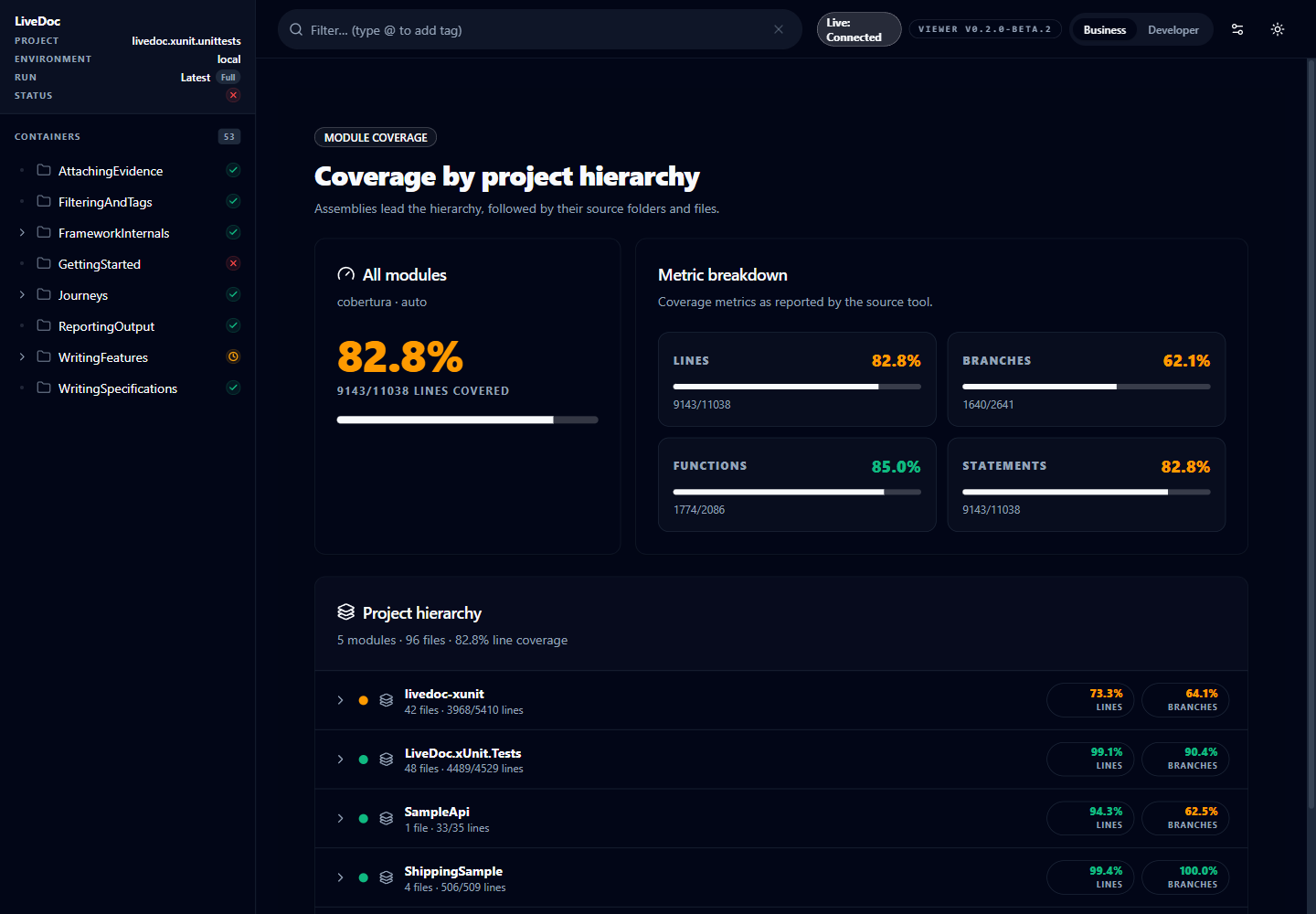
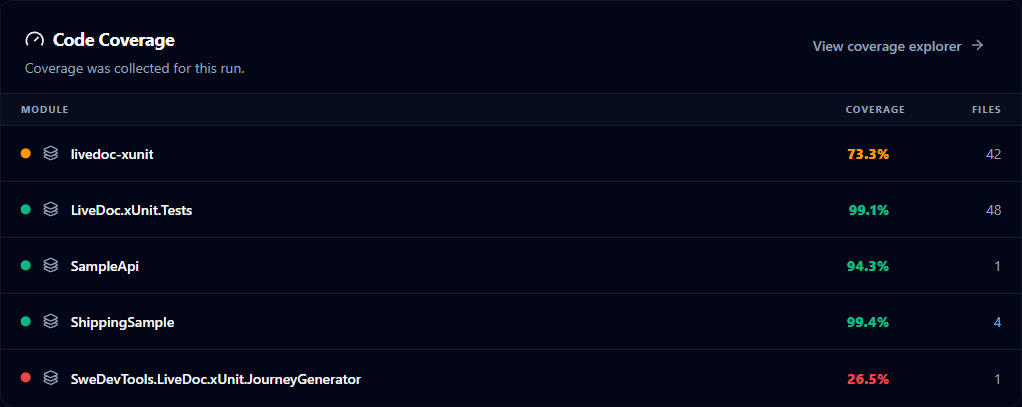
The overall line coverage is 82%, but the Journey Generator module is 27%. The module hierarchy immediately identifies the weak area without attributing that coverage to an unrelated test.
Result: The team gets the same project-oriented mental model it expects from Visual Studio, with the test documentation and coverage evidence in one place.
The Big Picture
Vitest normally supplies an in-memory Istanbul coverage map. .NET runners produce a VSTest attachment, commonly Microsoft Code Coverage or XPlat/Coverlet Cobertura. LiveDoc normalizes both into the same Viewer model.
Choose a Setup
| Test runner | Recommended collector | Required dependency | Run command |
|---|---|---|---|
| Vitest | V8 coverage | @vitest/coverage-v8 matching your Vitest version | npx vitest run --coverage |
xUnit / dotnet test | Microsoft Code Coverage with Cobertura output | SweDevTools.LiveDoc.xUnit; the LiveDoc collector is included | dotnet test <solution> --collect:"Code Coverage;Format=Cobertura" |
| xUnit alternative | XPlat Code Coverage (Coverlet) | coverlet.collector in every participating test project | dotnet test --collect:"XPlat Code Coverage" |
| Visual Studio | Analyze Code Coverage for All Tests | dotnet-coverage when Visual Studio emits binary .coverage files | Use the Test menu command |
Configure Vitest
Install the dependencies
Install the LiveDoc reporter, Vitest, and the coverage provider. Keep
@vitest/coverage-v8 on the same major/minor version as Vitest.
npm install --save-dev vitest@^4.0.16 @vitest/coverage-v8 @swedevtools/livedoc-vitest
If you use the Istanbul provider instead, install
@vitest/coverage-istanbul and change the provider to istanbul.
Enable coverage and LiveDoc publishing
// vitest.config.ts
import { defineConfig } from 'vitest/config';
import { LiveDocSpecReporter } from '@swedevtools/livedoc-vitest/reporter';

export default defineConfig({
  test: {
    include: ['**/*.Spec.ts'],
    reporters: [
      new LiveDocSpecReporter({
        coverage: {
          enabled: true,
          thresholds: {
            lines: 80,
            branches: 75,
          },
        },
      }),
    ],
    coverage: {
      enabled: true,
      provider: 'v8',
      reporter: ['text', 'html', 'json-summary'],
    },
  },
});
Run the suite:
npx vitest run --coverage
LiveDoc consumes the in-memory map before publication. The json-summary
reporter is a useful fallback for tools that execute reporters differently.
LiveDoc also discovers coverage/coverage-summary.json and coverage/lcov.info.
For another artifact location, configure coverage.artifactPath on
LiveDocSpecReporter or set LIVEDOC_COVERAGE_PATH.
Configure xUnit and .NET
Install the test dependencies
A normal LiveDoc xUnit project needs the package, the .NET test SDK, xUnit, and the Visual Studio runner:
<ItemGroup>
  <PackageReference Include="Microsoft.NET.Test.Sdk" Version="17.8.0" />
  <PackageReference Include="xunit" Version="2.9.3" />
  <PackageReference Include="xunit.runner.visualstudio" Version="2.8.2" />
  <PackageReference Include="SweDevTools.LiveDoc.xUnit" Version="0.3.0" />
</ItemGroup>
SweDevTools.LiveDoc.xUnit includes the LiveDocCoverage VSTest collector and
attachment processor. You do not need coverlet.collector for the recommended
Microsoft Code Coverage command.
Recommended CLI command
Use Microsoft Code Coverage and request Cobertura directly. This captures branch data and preserves the module/assembly hierarchy used by the Viewer.
dotnet test .\dotnet\xunit\livedoc-xunit.sln --collect:"Code Coverage;Format=Cobertura"
For another solution:
dotnet test .\MySolution.sln --collect:"Code Coverage;Format=Cobertura"
The LiveDoc reporter completes the test result first. VSTest then finalizes the coverage attachment, and the packaged attachment processor patches coverage into the completed run. This is why coverage can appear a moment after the test counts.
Visual Studio
Use Test > Analyze Code Coverage for All Tests. Running Run All Tests does not request coverage and LiveDoc intentionally hides all coverage UI.
Visual Studio may emit a binary .coverage attachment instead of Cobertura.
Install Microsoft's converter once:
dotnet tool install --global dotnet-coverage
If it is installed through a local tool manifest or another directory, set
LIVEDOC_DOTNET_COVERAGE_TOOL to the executable path. Restart Visual Studio
after upgrading the LiveDoc NuGet package so its cached test adapter and
collector paths are refreshed.
XPlat/Coverlet alternative
XPlat Code Coverage is Coverlet's VSTest collector. It supports line, branch, and method coverage and writes Cobertura directly. Choose it when you need Coverlet's open-source, cross-platform tooling or already publish Coverlet reports in CI.
Install coverlet.collector in every test project that participates in the
solution run:
dotnet add package coverlet.collector
$env:LIVEDOC_COVERAGE = "true"
dotnet test .\MySolution.sln --collect:"XPlat Code Coverage"
Coverlet excludes test assemblies by default. To include them, use a custom runsettings file containing both collectors:
<?xml version="1.0" encoding="utf-8"?>
<RunSettings>
  <DataCollectionRunSettings>
    <DataCollectors>
      <DataCollector friendlyName="XPlat Code Coverage">
        <Configuration>
          <Format>cobertura</Format>
          <IncludeTestAssembly>true</IncludeTestAssembly>
        </Configuration>
      </DataCollector>
      <DataCollector
        friendlyName="LiveDocCoverage"
        uri="datacollector://swedevtools/livedoc/coverage"
        enabled="True" />
    </DataCollectors>
  </DataCollectionRunSettings>
</RunSettings>
dotnet test .\MySolution.sln --settings .\coverage.runsettings --collect:"XPlat Code Coverage"
Collector capability and scope
| Capability | Microsoft Code Coverage | XPlat / Coverlet |
|---|---|---|
| Line coverage | Yes | Yes |
| Branch coverage | Yes | Yes |
| Method/function coverage | Yes | Yes |
| Direct Cobertura | Format=Cobertura | Default collector output |
| Managed .NET | Yes | Yes |
| Native code | Supported when configured | No |
| Visual Studio integration | Native | Primarily CLI/CI |
| Test assemblies | Included by VSTest default/configuration | Excluded by default; enable IncludeTestAssembly |
| Solution behavior | One invocation-level view aligned with Visual Studio | Usually one artifact per test project/testhost |
LiveDoc merges all valid coverage attachments it receives. It cannot invent
coverage for a project when Coverlet does not emit an attachment—for example,
if that testhost terminates before finalization. For the most consistent
solution-wide, Visual Studio-style module picture, prefer Microsoft Code
Coverage with Format=Cobertura. Use one collector consistently when comparing
trends.
Custom .runsettings
The NuGet package selects its packaged runsettings when coverage is requested
and no custom settings are active. If your solution already sets
RunSettingsFilePath or VSTestSetting, LiveDoc preserves it. Add the
LiveDoc collector to your file:
<?xml version="1.0" encoding="utf-8"?>
<RunSettings>
  <DataCollectionRunSettings>
    <DataCollectors>
      <DataCollector
        friendlyName="LiveDocCoverage"
        uri="datacollector://swedevtools/livedoc/coverage"
        enabled="True" />
    </DataCollectors>
  </DataCollectionRunSettings>
</RunSettings>
LD-COV-000 confirms automatic settings selection. LD-COV-001 confirms that
a custom file was preserved and needs the collector entry above.
Read Coverage in the Viewer
The dashboard hides coverage until the selected run contains file-level data. When available, it adds Coverage to Quality Signals and shows a project/module summary below the failures section.
The detail view provides:
- Weighted totals rather than averages of percentages
- Health colors for line and branch percentages
- Module/project rows with file counts and covered/total line counts
- Collapsed modules by default
- Common path prefixes removed before folder/file navigation
- Diagnostics for missing, stale, malformed, or unsupported artifacts
Coverage belongs to the test invocation and covered module. LiveDoc does not claim that a particular scenario produced a particular line hit.
Thresholds
Vitest thresholds are configured on the reporter, as shown above. xUnit accepts environment variables:
$env:LIVEDOC_COVERAGE_THRESHOLD_LINES = "80"
$env:LIVEDOC_COVERAGE_THRESHOLD_BRANCHES = "75"
dotnet test .\MySolution.sln --collect:"Code Coverage;Format=Cobertura"
Supported suffixes are LINES, BRANCHES, FUNCTIONS, and STATEMENTS.
Threshold warnings do not fail tests.
Troubleshooting
| Problem | Likely cause | Resolution |
|---|---|---|
| Coverage UI is absent | The run did not request or attach coverage | Use --coverage, --collect, or Visual Studio Analyze Code Coverage |
| Vitest reports no coverage | Coverage provider is missing or not enabled | Install @vitest/coverage-v8 and set coverage.enabled: true or run with --coverage |
dotnet-coverage-missing / LD-COV-062 | A binary .coverage file needs conversion | Install dotnet-coverage or set LIVEDOC_DOTNET_COVERAGE_TOOL |
LD-COV-001 | Custom runsettings prevented automatic selection | Merge the LiveDocCoverage collector entry into the custom file |
artifact-missing | The runner did not produce a supported artifact | Request Cobertura or set LIVEDOC_COVERAGE_PATH |
| Coverage differs between collectors | Microsoft and Coverlet use different default module scopes | Compare runs produced by the same collector; enable IncludeTestAssembly for XPlat when required |
| XPlat only shows some projects | coverlet.collector is missing from a test project, or its testhost did not emit an attachment | Install Coverlet in every test project and inspect each TestResults directory |
| Visual Studio still uses old behavior | Test adapter/collector cache is stale | Rebuild, restart Visual Studio, and rerun Analyze Code Coverage |
Implementation Reference
- Vitest collection:
packages/vitest/_src/app/reporter/CoverageCollector.ts:33,collectCoverageReport - Vitest integration:
packages/vitest/_src/app/reporter/LiveDocSpecReporter.ts,onCoverageat line 115 - xUnit in-process parsing:
dotnet/xunit/src/Reporter/CoverageCollector.cs:10 - xUnit post-run collection:
dotnet/xunit/collector/LiveDocCoverageDataCollector.cs:12anddotnet/xunit/collector/LiveDocCoverageAttachmentProcessor.cs:11 - Viewer aggregation:
packages/viewer/src/client/lib/coverage-utils.ts:28 - Viewer hierarchy:
packages/viewer/src/client/components/CoverageView.tsx:30 - Related tests:
packages/viewer/test/CoverageModules.Spec.ts,dotnet/xunit/tests/ReportingOutput/Coverage_Output_Spec.cs, andCoverage_Collector_Spec.cs
Key Takeaways
- Request coverage explicitly: Ordinary test runs do not show coverage.
- Prefer native data: Vitest uses its in-memory map; .NET works best with Microsoft Code Coverage formatted as Cobertura.
- Install the right provider: Vitest needs a coverage provider; binary
Visual Studio coverage needs
dotnet-coverage. - Compare like with like: Collector scope changes the module denominator.
- Treat coverage as evidence: It informs quality decisions without changing executable-specification status.