Scenario Outlines
Docs for Vitest SDK v0.3.3
When you need to test the same behavior with different inputs, writing separate scenarios for each combination quickly becomes tedious. Scenario Outlines (and their specification counterpart, Rule Outlines) let you define the test logic once and run it across many data rows.
The Problem
Imagine testing a discount calculator. Without outlines, you'd write:
scenario('No discount for orders under $50', () => {
  given("an order total of '49.99'", (ctx) => { /* ... */ });
  then("the discount is '0'", (ctx) => { /* ... */ });
});

scenario('5% discount for orders $50–$99', () => {
  given("an order total of '75.00'", (ctx) => { /* ... */ });
  then("the discount is '3.75'", (ctx) => { /* ... */ });
});

scenario('10% discount for orders $100+', () => {
  given("an order total of '120.00'", (ctx) => { /* ... */ });
  then("the discount is '12.00'", (ctx) => { /* ... */ });
});
Three scenarios with almost identical logic. With a scenario outline, this becomes one definition plus a data table.
Your First Scenario Outline
// tests/Discounts.Spec.ts
import {
  feature,
  scenarioOutline,
  given,
  when,
  Then as then,
} from '@swedevtools/livedoc-vitest';

function calculateDiscount(total: number): number {
  if (total >= 100) return total * 0.10;
  if (total >= 50) return total * 0.05;
  return 0;
}

feature('Order Discounts', () => {
  scenarioOutline(`Discount is calculated based on order total

    Examples:
    | orderTotal | expectedDiscount |
    |      30.00 |             0.00 |
    |      49.99 |             0.00 |
    |      50.00 |             2.50 |
    |      75.00 |             3.75 |
    |     100.00 |            10.00 |
    |     200.00 |            20.00 |
  `, (ctx) => {
    let discount = 0;

    given('an order with total <orderTotal>', () => {
      // ctx.example is available in the outline callback scope
    });

    when('the discount is calculated', () => {
      discount = calculateDiscount(ctx.example.orderTotal);
    });

    then('the discount amount is <expectedDiscount>', () => {
      expect(discount).toBe(ctx.example.expectedDiscount);
    });
  });
});
How It Works
The Examples Table
The Examples table lives inside the scenario outline's title string:
scenarioOutline(`My outline title

  Examples:
  | column1 | column2 |
  | value1  | value2  |
  | value3  | value4  |
`, (ctx) => { /* ... */ });
Each row creates a separate test run. The scenario body executes once per
row, with ctx.example populated from that row's data.
Accessing Example Data — ctx.example
The ctx.example object maps column headers to values:
scenarioOutline(`
  Examples:
  | username | age | active |
  | Alice    |  30 | true   |
`, (ctx) => {
  // ctx.example.username → "Alice" (string)
  // ctx.example.age      → 30      (number)
  // ctx.example.active   → true    (boolean)
});
Column name rules:
- Spaces are removed and the result is camelCased:
order total→orderTotal - Values are type-coerced automatically (numbers, booleans, etc.)
Placeholders in Step Titles
Use <columnName> in step titles to make the output self-documenting. These
are display-only — the actual values come from ctx.example:
scenarioOutline(`
  Examples:
  | city     | country   |
  | Sydney   | Australia |
  | Auckland | NZ        |
`, (ctx) => {
  given('the user is in <city>', () => {
    // The output will show: "Given the user is in Sydney"
    // Access the value: ctx.example.city
    const city = ctx.example.city;
  });
});
The <placeholder> syntax in step titles is purely cosmetic — it makes the
test output readable. Always use ctx.example to access the actual data
in your implementation.
Multiple Example Tables
You can group examples into labeled tables for documentation clarity:
feature('Shipping Rates', () => {
  scenarioOutline(`Shipping cost depends on weight and destination

    Examples: Domestic Shipping
    | weight | destination | cost  |
    |      1 | Sydney      |  5.00 |
    |      5 | Melbourne   | 12.00 |
    |     10 | Perth       | 18.00 |

    Examples: International Shipping
    | weight | destination | cost  |
    |      1 | London      | 25.00 |
    |      5 | New York    | 35.00 |
    |     10 | Tokyo       | 45.00 |
  `, (ctx) => {
    let shippingCost = 0;

    given('a package weighing <weight> kg', () => {
      // setup
    });

    when('shipping to <destination>', () => {
      shippingCost = calculateShipping(
        ctx.example.weight,
        ctx.example.destination
      );
    });

    then('the shipping cost is <cost>', () => {
      expect(shippingCost).toBe(ctx.example.cost);
    });
  });
});
All rows from both tables are executed. The labels (Domestic Shipping,
International Shipping) serve as documentation — they help readers understand
the groupings.
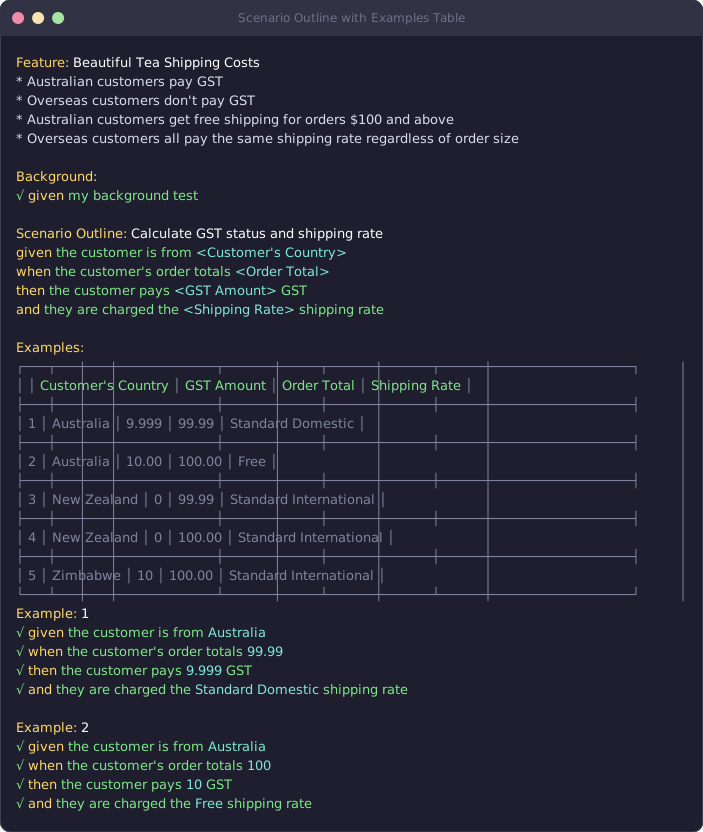
The output shows each example run:
Rule Outlines
The specification pattern has its own equivalent: ruleOutline. It works
exactly the same way but without Given/When/Then steps:
import { specification, ruleOutline } from '@swedevtools/livedoc-vitest';

function celsiusToFahrenheit(c: number): number {
  return (c * 9) / 5 + 32;
}

specification('Temperature Conversion', () => {
  ruleOutline(`Celsius to Fahrenheit conversion
    Examples:
    | celsius | fahrenheit |
    |       0 |         32 |
    |     100 |        212 |
    |     -40 |        -40 |
    |      37 |       98.6 |
  `, (ctx) => {
    const { celsius, fahrenheit } = ctx.example;
    expect(celsiusToFahrenheit(celsius)).toBe(fahrenheit);
  });
});
When to Use Which
| Pattern | Use when... |
|---|---|
scenarioOutline | Testing user-facing behavior with Given/When/Then narrative |
ruleOutline | Testing technical rules, algorithms, or pure functions |
Both support multiple example tables, placeholder syntax, and type coercion.
Real-World Example: Login Validation
Here's a practical scenario outline testing form validation:
// tests/LoginValidation.Spec.ts
import {
  feature,
  scenarioOutline,
  given,
  when,
  Then as then,
} from '@swedevtools/livedoc-vitest';

interface LoginResult {
  success: boolean;
  error?: string;
}

function attemptLogin(username: string, password: string): LoginResult {
  if (!username) return { success: false, error: 'Username required' };
  if (!password) return { success: false, error: 'Password required' };
  if (password.length < 8) return { success: false, error: 'Password too short' };
  if (username === 'admin' && password === 'admin1234') {
    return { success: true };
  }
  return { success: false, error: 'Invalid credentials' };
}

feature('Login Validation', () => {
  scenarioOutline(`Validate login credentials

    Examples: Valid Credentials
    | username | password  | success | error |
    | admin    | admin1234 | true    |       |

    Examples: Invalid Credentials
    | username | password  | success | error              |
    |          | admin1234 | false   | Username required  |
    | admin    |           | false   | Password required  |
    | admin    | short     | false   | Password too short |
    | admin    | wrongpass | false   | Invalid credentials|
  `, (ctx) => {
    let result: LoginResult;

    given('the user enters username <username> and password <password>', () => {
      // data comes from ctx.example
    });

    when('the login form is submitted', () => {
      result = attemptLogin(
        ctx.example.username ?? '',
        ctx.example.password ?? ''
      );
    });

    then('the login success is <success>', () => {
      expect(result.success).toBe(ctx.example.success);
    });

    then('the error message is <error>', () => {
      if (ctx.example.error) {
        expect(result.error).toBe(ctx.example.error);
      } else {
        expect(result.error).toBeUndefined();
      }
    });
  });
});
Tips & Patterns
Keep Example Tables Readable
Align your pipes and pad values for readability — the VS Code extension does this automatically:
// ✅ Well-formatted
scenarioOutline(`
  Examples:
  | input    | expected |
  | hello    | HELLO    |
  | world    | WORLD    |
  | LiveDoc  | LIVEDOC  |
`, (ctx) => { /* ... */ });

// ❌ Hard to read
scenarioOutline(`
  Examples:
  |input|expected|
  |hello|HELLO|
  |world|WORLD|
`, (ctx) => { /* ... */ });
Test Boundary Conditions
Outlines are perfect for boundary-value testing — just add rows:
ruleOutline(`Age verification
  Examples:
  | age | allowed |
  |  16 | false   |
  |  17 | false   |
  |  18 | true    |
  |  19 | true    |
  |  65 | true    |
`, (ctx) => {
  expect(isAllowed(ctx.example.age)).toBe(ctx.example.allowed);
});
Avoid Too Many Columns
If your table has more than 5–6 columns, consider splitting into separate outlines or using a setup step to reduce complexity.
Scenario outline callbacks must be synchronous. If you need async
operations, put them inside individual step callbacks — only steps support
async.
Recap
scenarioOutlineruns the same scenario across multiple data rowsruleOutlineis the specification-pattern equivalentctx.exampleprovides type-coerced access to the current row's data<placeholder>syntax in step titles makes output self-documenting- Multiple Example tables organize data into labeled groups
- Column names with spaces are auto-camelCased (
order total→orderTotal)
Next Steps
- Next in this series: Tutorial: Beautiful Tea — build a complete real-world specification from scratch
- Deep dive: scenarioOutline() Reference — full API documentation
- Deep dive: ruleOutline() Reference — full rule outline API
- Practical use: Tags & Filtering — run subsets of your outlines