Tutorial: Beautiful Tea
Docs for Vitest SDK v0.3.3
In this tutorial you'll take a real business requirement and turn it into an executable, living specification. By the end you'll have a complete feature file that documents shipping rules, validates business logic, and serves as permanent documentation for your team.
This tutorial is adapted from Alister Scott's excellent article Specification by Example: a Love Story. It demonstrates how to think in Gherkin and write specs anyone on your team can understand.
The Business Requirement
You're working for Beautiful Tea, an Australian company that ships tea worldwide. The business hands you this requirement:
"We need to charge different amounts for our customers overseas versus Australia. The tax office says we must charge GST for Australian customers but not for overseas ones. Also, we got a great deal with a local shipping company — we can ship anywhere in Australia for free if they spend more than AUD$100, but we still have to charge overseas customers."
Your mission: implement and document these rules as a living specification.
Step 1: Think in Features, Not Code
❌ The Technical Approach
A developer's first instinct might be:
Feature: Add additional shipping options to shopping cart
This describes what you're building but not why. It focuses on the implementation, not the business value.
✅ The Business Approach
Rewrite from the business perspective:
Feature: Beautiful Tea Shipping Costs
  * Australian customers pay GST
  * Overseas customers don't pay GST
  * Australian customers get free shipping for orders $100 and above
  * Overseas customers all pay the same shipping rate regardless of order size
Notice the difference:
- No mention of websites, shopping carts, or technical details
- Focuses on business rules anyone can understand
- A new team member could read this and understand the shipping policy
Step 2: Think in Scenarios, Not UI Steps
❌ The UI-Focused Approach
A common mistake is writing scenarios that mirror the user interface:
Scenario: Free shipping in Australia
  Given I am on the Beautiful Tea home page
  When I search for 'Byron Breakfast' tea
  Then I see the page for 'Byron Breakfast' tea
  When I add 'Byron Breakfast' tea to my cart
    And I select 10 as the quantity
  Then I see 10 x 'Byron Breakfast' tea in my cart
  When I select 'Check Out'
    And I enter my country as 'Australia'
  Then I see the total including GST
    And I see that I am eligible for free shipping
Problems with this approach:
- Very long and repetitive
- Tied to UI implementation (breaks when UI changes)
- Doesn't clearly explain the rules
- You'd need many similar scenarios for different cases
✅ The Declarative Approach
Focus on the business rules using a scenario outline:
Scenario Outline: Calculate GST status and shipping rate
  Given the customer is from <country>
  When the customer's order totals <order total>
  Then the customer pays <GST amount> GST
    And they are charged the <shipping rate> shipping rate

  Examples:
  | country     | order total | GST amount | shipping rate          |
  | Australia   |       99.99 |      9.999 | Standard Domestic      |
  | Australia   |      100.00 |      10.00 | Free                   |
  | New Zealand |       99.99 |          0 | Standard International |
  | New Zealand |      100.00 |          0 | Standard International |
  | Zimbabwe    |      100.00 |          0 | Standard International |
Benefits:
- Crystal clear what the rules are
- Easy to add new test cases — just add a row
- Not tied to any UI or implementation
- Serves as documentation for the entire team
Step 3: Create the Spec File
Create tests/ShippingCosts.Spec.ts and set up the imports:
// tests/ShippingCosts.Spec.ts
import {
  feature,
  scenarioOutline,
  given,
  when,
  Then as then,
  and,
} from '@swedevtools/livedoc-vitest';
Step 4: Write the Feature
Start with the feature block — this is the "title page" of your living document:
feature(`Beautiful Tea Shipping Costs

  Avoids incorrect tax amounts and delivery tiers for the
  destinations and totals tested below.
`, () => {

  // scenarios will go here

});
Use a template literal for the Feature's purpose. The Scenario steps and Examples table below show the precise tax and shipping rules tested.
Step 5: Add the Scenario Outline
Inside the feature, add the scenario outline with its Examples table:
feature(`Beautiful Tea Shipping Costs

  Avoids incorrect tax amounts and delivery tiers for the
  destinations and totals tested below.
`, () => {

  scenarioOutline(`Calculate GST status and shipping rate

    Examples:
    |   country   | order total | GST amount |     shipping rate      |
    | Australia   |       99.99 |      9.999 | Standard Domestic      |
    | Australia   |      100.00 |      10.00 | Free                   |
    | New Zealand |       99.99 |          0 | Standard International |
    | New Zealand |      100.00 |          0 | Standard International |
    | Zimbabwe    |      100.00 |          0 | Standard International |
  `, (ctx) => {

    // steps go here

  });
});
Step 6: Implement the Steps
Now fill in the Given/When/Then steps. Each step uses ctx.example to access
the current row's data:
scenarioOutline(`Calculate GST status and shipping rate

  Examples:
  |   country   | order total | GST amount |     shipping rate      |
  | Australia   |       99.99 |      9.999 | Standard Domestic      |
  | Australia   |      100.00 |      10.00 | Free                   |
  | New Zealand |       99.99 |          0 | Standard International |
  | New Zealand |      100.00 |          0 | Standard International |
  | Zimbabwe    |      100.00 |          0 | Standard International |
`, (ctx) => {
  let cart: ShoppingCart;

  given("the customer is from '<country>'", () => {
    cart = new ShoppingCart();
    cart.country = ctx.example.country;
  });

  when("the customer's order totals '<order total>'", () => {
    cart.addItem({ product: 'tea', quantity: 1, price: ctx.example.orderTotal });
    cart.calculateInvoice();
  });

  then("the customer pays '<GST amount>' GST", () => {
    expect(cart.gst).toBe(ctx.example.GSTAmount);
  });

  and("they are charged the '<shipping rate>' shipping rate", () => {
    expect(cart.shippingRate).toBe(ctx.example.shippingRate);
  });
});
Understanding ctx.example
Each column header becomes a property on ctx.example. Note how column names
are transformed:
| Column Header | Property Name | Why |
|---|---|---|
country | ctx.example.country | No change needed |
order total | ctx.example.orderTotal | Spaces removed, camelCased |
GST amount | ctx.example.GSTAmount | Spaces removed, case preserved |
shipping rate | ctx.example.shippingRate | Spaces removed, camelCased |
Values are type-coerced automatically:
99.99→number0→number"Australia"→string"Free"→string
For a complete guide to data access patterns, see Data Extraction and Scenario Outlines.
Step 7: Build the Implementation
Now write the code that makes the spec pass. Create src/ShoppingCart.ts:
// src/ShoppingCart.ts

export interface CartItem {
  product: string;
  quantity: number;
  price: number;
}

export class ShoppingCart {
  country = '';
  items: CartItem[] = [];
  gst = 0;
  shippingRate = '';

  addItem(item: CartItem): void {
    this.items.push(item);
  }

  calculateInvoice(): void {
    const total = this.items.reduce(
      (sum, item) => sum + item.price * item.quantity,
      0
    );

    // GST rule: 10% for Australian customers, 0% for everyone else
    this.gst = this.country === 'Australia'
      ? parseFloat((total * 0.1).toFixed(3))
      : 0;

    // Shipping rule:
    //   - Australia + $100+ → Free
    //   - Australia + <$100 → Standard Domestic
    //   - Everyone else → Standard International
    if (this.country === 'Australia') {
      this.shippingRate = total >= 100 ? 'Free' : 'Standard Domestic';
    } else {
      this.shippingRate = 'Standard International';
    }
  }
}
Step 8: The Complete Spec File
Here's everything together:
// tests/ShippingCosts.Spec.ts
import {
  feature,
  scenarioOutline,
  given,
  when,
  Then as then,
  and,
} from '@swedevtools/livedoc-vitest';
import { ShoppingCart } from '../src/ShoppingCart';

feature(`Beautiful Tea Shipping Costs

  Avoids incorrect tax amounts and delivery tiers for the
  destinations and totals tested below.
`, () => {

  scenarioOutline(`Calculate GST status and shipping rate

    Examples:
    |   country   | order total | GST amount |     shipping rate      |
    | Australia   |       99.99 |      9.999 | Standard Domestic      |
    | Australia   |      100.00 |      10.00 | Free                   |
    | New Zealand |       99.99 |          0 | Standard International |
    | New Zealand |      100.00 |          0 | Standard International |
    | Zimbabwe    |      100.00 |          0 | Standard International |
  `, (ctx) => {
    let cart: ShoppingCart;

    given("the customer is from '<country>'", () => {
      cart = new ShoppingCart();
      cart.country = ctx.example.country;
    });

    when("the customer's order totals '<order total>'", () => {
      cart.addItem({ product: 'tea', quantity: 1, price: ctx.example.orderTotal });
      cart.calculateInvoice();
    });

    then("the customer pays '<GST amount>' GST", () => {
      expect(cart.gst).toBe(ctx.example.GSTAmount);
    });

    and("they are charged the '<shipping rate>' shipping rate", () => {
      expect(cart.shippingRate).toBe(ctx.example.shippingRate);
    });
  });
});
Step 9: Run It 🎉
npx vitest run ShippingCosts.Spec.ts
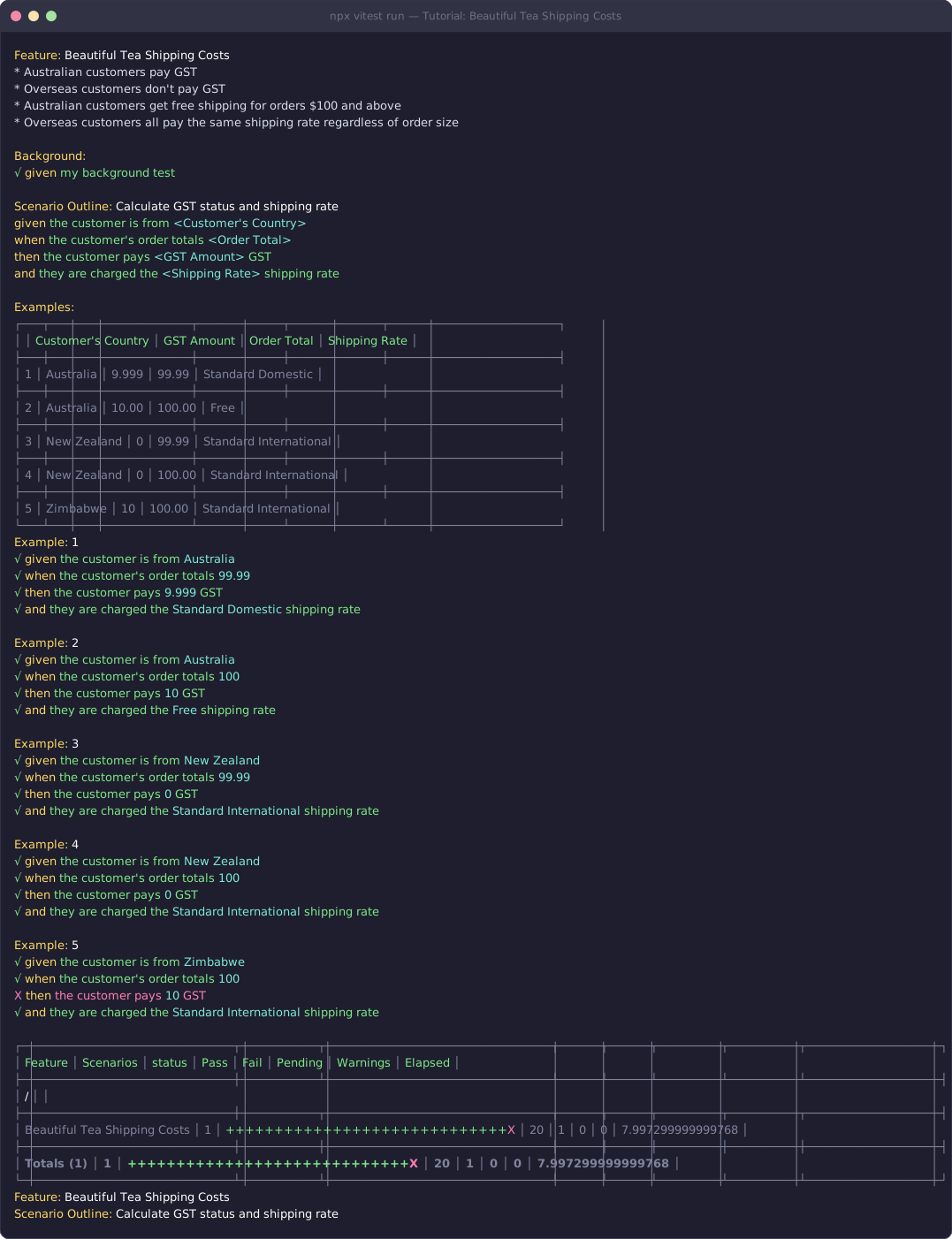
You'll see structured output like this:
Key Takeaways
1. Think Business, Not Technical
Write features and scenarios in business language. Anyone should be able to read and understand them — product managers, QA, new hires.
2. Be Declarative, Not Imperative
Focus on what should happen, not how it happens through the UI. Your specs should survive a complete UI rewrite.
3. Use Examples Liberally
Scenario outlines with example tables document boundary conditions and make adding new test cases trivial — just add a row.
4. Let the Spec Drive the Code
Write your specification first, then implement the code to make it pass. This is the heart of Behavior-Driven Development.
5. Maintain Living Documentation
Your specs should always reflect the current behavior. When requirements change, update the spec first — the failing tests tell you what code to change.
Try It Yourself
Challenge: Extend the Beautiful Tea spec to handle a new business rule:
"Express shipping is available for Australian orders over $200 at a flat rate of $15. International express is $50 for all countries."
Add a new scenario outline (or extend the existing examples table) to cover these cases. You'll need to update
ShoppingCart.calculateInvoice()too.
Recap
- Start with the business requirement — translate it into a feature description
- Write declarative scenarios — focus on rules, not UI interactions
- Use scenario outlines — one definition, many data rows
- Access data with
ctx.example— type-coerced column values - Build the implementation to match — let tests guide the code
What's Next?
Congratulations — you've built a complete living specification! 🎉
Here are some ways to continue your LiveDoc journey:
- Reference: feature(), scenarioOutline(), Context — full API details
- Guides: Best Practices — patterns for maintainable specifications
- Guides: Tags & Filtering — organize and run subsets of your specs
- Guides: Custom Reporters — customize the output format
- Guides: Viewer Integration — visualize your specs in the browser