Your First Feature
Docs for Vitest SDK v0.3.3
Now that you have LiveDoc running, let's write a real feature with multiple
scenarios. You'll learn every BDD keyword — feature,
scenario, background, given,
when, then, and, and but.
What You'll Build
A User Authentication feature with two scenarios:
- Successful login
- Failed login with wrong password
Along the way you'll learn how to add tags, descriptions, shared backgrounds, and how each keyword maps to the Gherkin spec.
The Feature
Create tests/UserAuth.Spec.ts:
// tests/UserAuth.Spec.ts
import {
  feature,
  scenario,
  background,
  given,
  when,
  Then as then,
  and,
  but,
} from '@swedevtools/livedoc-vitest';

// Simple in-memory auth for demonstration
const users = new Map([['alice', 'secret123']]);
let currentUser: string | null = null;
let loginError: string | null = null;

function login(username: string, password: string) {
  const stored = users.get(username);
  if (!stored) return { success: false, error: 'User not found' };
  if (stored !== password) return { success: false, error: 'Wrong password' };
  return { success: true, error: null };
}

feature(`User Authentication
  @auth @security
  As a registered user
  I want to log in with my credentials
  So that I can access my account
`, () => {

  background('A registered user exists', () => {
    given("a user named 'alice' with password 'secret123'", (ctx) => {
      const [name, password] = ctx.step.values;
      users.set(name, password);
    });
  });

  scenario('Successful login with valid credentials', () => {
    given("the user enters username 'alice'", (ctx) => {
      currentUser = ctx.step.values[0];
    });

    and("the user enters password 'secret123'", (ctx) => {
      const result = login(currentUser!, ctx.step.values[0]);
      loginError = result.error;
      if (result.success) {
        // user is now logged in
      } else {
        currentUser = null;
      }
    });

    when('the user submits the login form', () => {
      // action already performed in previous step
    });

    then('the user is logged in', () => {
      expect(currentUser).toBe('alice');
    });

    and('no error message is displayed', () => {
      expect(loginError).toBeNull();
    });
  });

  scenario('Failed login with wrong password', () => {
    given("the user enters username 'alice'", (ctx) => {
      currentUser = ctx.step.values[0];
    });

    and("the user enters password 'wrongpass'", (ctx) => {
      const result = login(currentUser!, ctx.step.values[0]);
      loginError = result.error;
      if (!result.success) {
        currentUser = null;
      }
    });

    when('the user submits the login form', () => {
      // action already performed
    });

    then('the user is not logged in', () => {
      expect(currentUser).toBeNull();
    });

    but("an error message says 'Wrong password'", (ctx) => {
      expect(loginError).toBe(ctx.step.values[0]);
    });
  });
});
Keyword by Keyword
feature(title, fn)
The top-level container. Everything inside a feature describes one capability of your system.
feature(`User Authentication
  @auth @security
  As a registered user
  I want to log in with my credentials
  So that I can access my account
`, () => { /* scenarios */ });
The title string is parsed as follows:
| Part | Meaning |
|---|---|
| First line | Feature title — "User Authentication" |
Lines starting with @ | Tags — used for filtering (see Tags & Filtering) |
| Remaining lines | Description — becomes part of your living documentation |
Access these at runtime through ctx.feature:
feature('My Feature @fast', (ctx) => {
  console.log(ctx.feature.title);       // "My Feature"
  console.log(ctx.feature.tags);        // ["fast"]
  console.log(ctx.feature.description); // ""
});
See feature() Reference for the complete API,
including .skip() and .only() modifiers.
scenario(title, fn)
A single test case inside a feature. Each scenario is independent — it sets up its own state, performs an action, and asserts an outcome.
scenario('Successful login with valid credentials', () => {
  given(/* ... */);
  when(/* ... */);
  then(/* ... */);
});
Scenarios support the same title format as features — you can add tags and descriptions:
scenario(`Edge case: empty password
  @negative
  Verifies that an empty password is rejected
`, () => { /* steps */ });
Scenario callbacks must be synchronous. If you need async work, put it
inside individual steps — only steps (and rule) support async.
background(title, fn)
Background steps run before every scenario in the feature. Use them for shared preconditions.
background('A registered user exists', () => {
  given("a user named 'alice' with password 'secret123'", (ctx) => {
    users.set(ctx.step.values[0], ctx.step.values[1]);
  });
});
The background above runs before both the "Successful login" and "Failed login" scenarios. This keeps your scenarios focused on what's unique to each test case.
Cleanup with afterBackground: If your background sets up resources that
need teardown, use ctx.afterBackground():
background('Database setup', (ctx) => {
  given('a database connection', () => {
    db = openConnection();
  });

  ctx.afterBackground(() => {
    db.rollback();
    db.close();
  });
});
The cleanup function runs after each scenario completes — similar to
afterEach in plain Vitest.
given / when / then
The three-act structure of BDD:
| Keyword | Purpose | Analogy |
|---|---|---|
| given | Arrange — set up preconditions | "The world looks like this" |
| when | Act — perform the action under test | "Something happens" |
| then | Assert — verify the outcome | "The world should now look like this" |
Steps are the only place where async is supported:
given('a product exists in the database', async (ctx) => {
  await db.insert({ name: 'Widget', price: 9.99 });
});
and / but
Continue the previous step type for readability:
given('a logged-in user', () => { /* ... */ });
and('the user has items in their cart', () => { /* ... */ });
and('a valid payment method on file', () => { /* ... */ });

when('the user clicks checkout', () => { /* ... */ });

then('the order is placed', () => { /* ... */ });
but('the card is not charged until shipping', () => { /* ... */ });
and continues the flow. but signals a contrasting or unexpected outcome.
Expected Output
When you run npx vitest run, the feature above produces:
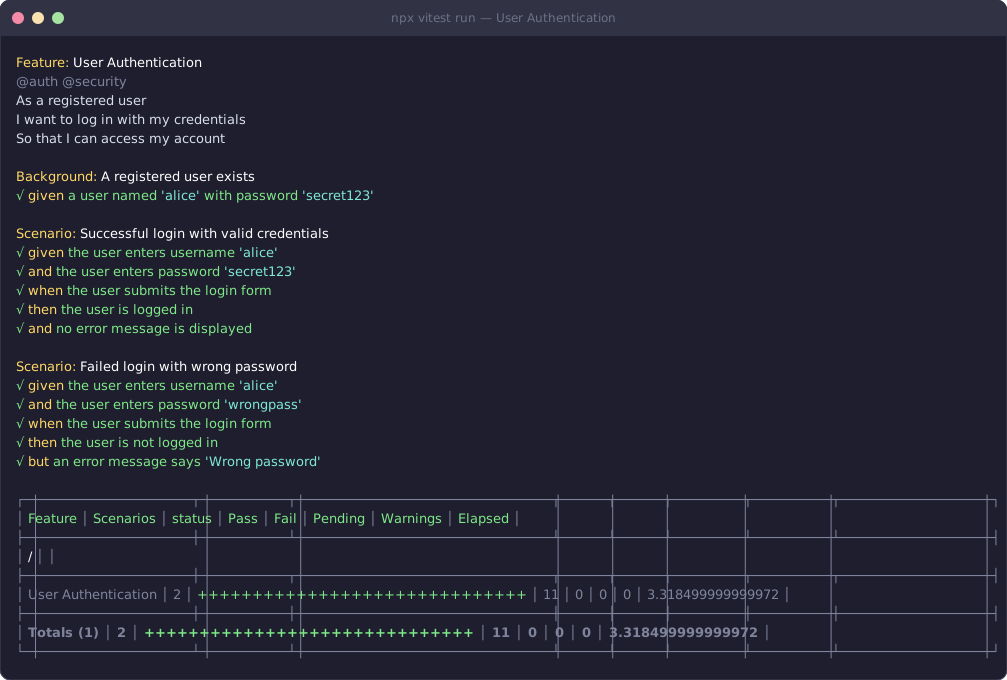
Notice how the output reads like a specification document, not a list of test function names. That's the power of living documentation.
Skip and Only
Focus your test runs with modifiers:
feature.skip('Disabled feature', () => { /* ... */ });
feature.only('Focus on this feature', () => { /* ... */ });

scenario.skip('Not implemented yet', () => { /* ... */ });
scenario.only('Debugging this scenario', () => { /* ... */ });
Best Practices
1. Write Declarative Steps
// ✅ Describes intent
given('a user with admin privileges', () => { /* ... */ });

// ❌ Leaks implementation details
given("INSERT INTO users VALUES ('admin')", () => { /* ... */ });
2. One Action per When
// ✅ Single, clear action
when('the user clicks submit', () => { /* ... */ });

// ❌ Multiple actions bundled together
when('the user fills the form and clicks submit and waits', () => { /* ... */ });
3. Put Data in Step Titles
// ✅ Self-documenting — values visible in output
then("the balance should be '300' dollars", (ctx) => {
  expect(account.balance).toBe(ctx.step.values[0]);
});

// ❌ Values hidden inside the implementation
then('the balance is correct', () => {
  expect(account.balance).toBe(300);
});
See Data Extraction for all the ways to embed and extract data from step titles.
Recap
featuregroups related scenarios with optional tags and descriptionsscenariois a single test case with the Given / When / Then structurebackgroundprovides shared setup that runs before every scenariogiven/when/thenare the three-act BDD structure — only these supportasyncand/butcontinue the previous step type for readability- Step titles become your living documentation — make them descriptive
Next Steps
- Next in this series: Your First Spec — learn the Specification pattern for technical rules
- Deep dive: scenario() Reference — full API for scenarios
- Practical use: Best Practices — patterns for maintainable specs