Your First Spec
Docs for Vitest SDK v0.3.3
Not every test needs the ceremony of Given / When / Then. The Specification pattern gives you a concise way to document technical rules and domain logic — perfect for unit tests, algorithms, and validation logic.
BDD vs Specification — When to Use Each
Before diving in, here's when to reach for each pattern:
| Aspect | BDD (feature / scenario) | Specification (specification / rule) |
|---|---|---|
| Best for | Workflows, acceptance tests | Precise domain policies, contracts, algorithms |
| Reader's focus | Following a narrative | Inspecting exact rules and examples |
| Structure | Given / When / Then steps | Direct assertions |
| Verbosity | Higher (structured steps) | Lower (compact rules) |
| Data-driven | scenarioOutline + Examples | ruleOutline + Examples |
You can use both patterns under the same capability. A product manager can read the Checkout Feature, then inspect the detailed Shipping rates rules:
tests
├── Accounts
│   └── PasswordValidation.Spec.ts    specification("Password Validation Rules")
└── Orders
    ├── Checkout.Spec.ts              feature("Checkout")
    └── Pricing
        └── ShippingRates.Spec.ts     specification("Shipping rates")
See Test Organization for the equivalent xUnit namespace structure.
Your First Specification
Create tests/Accounts/PasswordValidation.Spec.ts:
// tests/Accounts/PasswordValidation.Spec.ts
import { specification, rule } from '@swedevtools/livedoc-vitest';

// Simple password validator for demonstration
function isValidPassword(password: string): { valid: boolean; reason?: string } {
  if (password.length < 8) return { valid: false, reason: 'Too short' };
  if (!/[0-9]/.test(password)) return { valid: false, reason: 'No number' };
  if (!/[A-Z]/.test(password)) return { valid: false, reason: 'No uppercase' };
  return { valid: true };
}

specification(`Password Validation Rules
  @security @validation
  Helps callers reject weak passwords before accepting them.
`, () => {

  rule("Passwords must be at least '8' characters long", (ctx) => {
    const minLength = ctx.step.values[0]; // 8
    expect(isValidPassword(`A1${'a'.repeat(minLength - 3)}`).valid).toBe(false);
    expect(isValidPassword(`A1${'a'.repeat(minLength - 2)}`).valid).toBe(true);
  });

  rule('Passwords must contain at least one number', () => {
    expect(isValidPassword('Abcdefgh').valid).toBe(false);
    expect(isValidPassword('Abcdefg1').valid).toBe(true);
  });

  rule('Passwords must contain at least one uppercase letter', () => {
    expect(isValidPassword('abcdefg1').valid).toBe(false);
    expect(isValidPassword('Abcdefg1').valid).toBe(true);
  });

  rule('Valid passwords are accepted', () => {
    const result = isValidPassword('MyP@ss1word');
    expect(result.valid).toBe(true);
    expect(result.reason).toBeUndefined();
  });
});
Understanding the Keywords
specification(title, fn)
The top-level container — analogous to feature in BDD. It groups related
rules under a single heading.
specification(`Password Validation Rules
  @security @validation
  Helps callers reject weak passwords before accepting them.
`, () => {
  // rules go here
});
The title string follows the same parsing as feature:
| Part | Meaning |
|---|---|
| First line | Specification title |
Lines starting with @ | Tags for filtering |
| Remaining lines | Description |
Access at runtime via ctx.specification:
specification('My Spec @fast', (ctx) => {
  rule('Access spec metadata', (ctx) => {
    console.log(ctx.specification.title); // "My Spec"
    console.log(ctx.specification.tags);  // ["fast"]
  });
});
rule(title, fn)
A single testable requirement. Each rule runs as an independent test — like
Vitest's it() — but with a descriptive name that reads as documentation.
rule('Email addresses must contain @', (ctx) => {
  expect(validateEmail('invalid')).toBe(false);
  expect(validateEmail('user@example.com')).toBe(true);
});
Key difference from scenario: rules don't use Given / When / Then steps.
Assertions live directly in the rule body.
Rules support async. Specifications do not — put async work inside
individual rules.
Async Rules
Rules are the only specification-pattern block that supports async:
specification('API Endpoints', () => {
  rule('GET /api/health returns 200', async () => {
    const response = await fetch('http://localhost:3000/api/health');
    expect(response.status).toBe(200);
  });

  rule('GET /api/users requires authentication', async () => {
    const response = await fetch('http://localhost:3000/api/users');
    expect(response.status).toBe(401);
  });
});
Extracting Values from Rule Titles
Just like BDD steps, rules can embed data in their titles. This keeps your living documentation self-describing — readers see the values right in the rule name.
Quoted Values — ctx.rule.values
rule("Discounts above '15' percent require manager approval", (ctx) => {
  const threshold = ctx.rule.values[0]; // 15 (number)
  expect(requiresApproval(threshold)).toBe(true);
  expect(requiresApproval(threshold - 1)).toBe(false);
});
Values are auto-coerced just like step values:
| Quoted Value | Coerced Type | Result |
|---|---|---|
'42' | number | 42 |
'3.14' | number | 3.14 |
'true' | boolean | true |
'hello' | string | "hello" |
Named Values — ctx.rule.params
For more readable code, use the <name:value> syntax:
rule('The result of <a:10> + <b:20> should be <expected:30>', (ctx) => {
  const { a, b, expected } = ctx.rule.params;
  expect(a + b).toBe(expected); // 10 + 20 === 30
});
Named values have the same coercion behavior as quoted values but produce cleaner code — no positional indexing.
Raw (String) Access
If you need the original string before coercion:
rule("Format the amount '$1,234.56'", (ctx) => {
  const raw = ctx.rule.valuesRaw[0]; // "$1,234.56" (string)
  const coerced = ctx.rule.values[0]; // "$1,234.56" (string — not a number because of $ and ,)
});
Data-Driven Rules with ruleOutline
When you have many input/output combinations, ruleOutline runs the same
rule body for each row in an Examples table:
import { specification, ruleOutline } from '@swedevtools/livedoc-vitest';

function calculateTaxRate(income: number): number {
  if (income <= 18200) return 0;
  if (income <= 45000) return 0.19;
  if (income <= 120000) return 0.325;
  return 0.37;
}

specification('Australian Tax Brackets', () => {
  ruleOutline(`Tax rate is determined by income
    Examples:
    | income  | expectedRate |
    |   10000 |            0 |
    |   30000 |         0.19 |
    |   80000 |        0.325 |
    |  150000 |         0.37 |
  `, (ctx) => {
    const { income, expectedRate } = ctx.example;
    expect(calculateTaxRate(income)).toBe(expectedRate);
  });
});
Each row produces a separate test run. The output shows every combination clearly — making boundary conditions part of your documentation.
See Scenario Outlines & Rule Outlines for a complete guide to data-driven testing patterns.
Expected Output
Running npx vitest run produces:
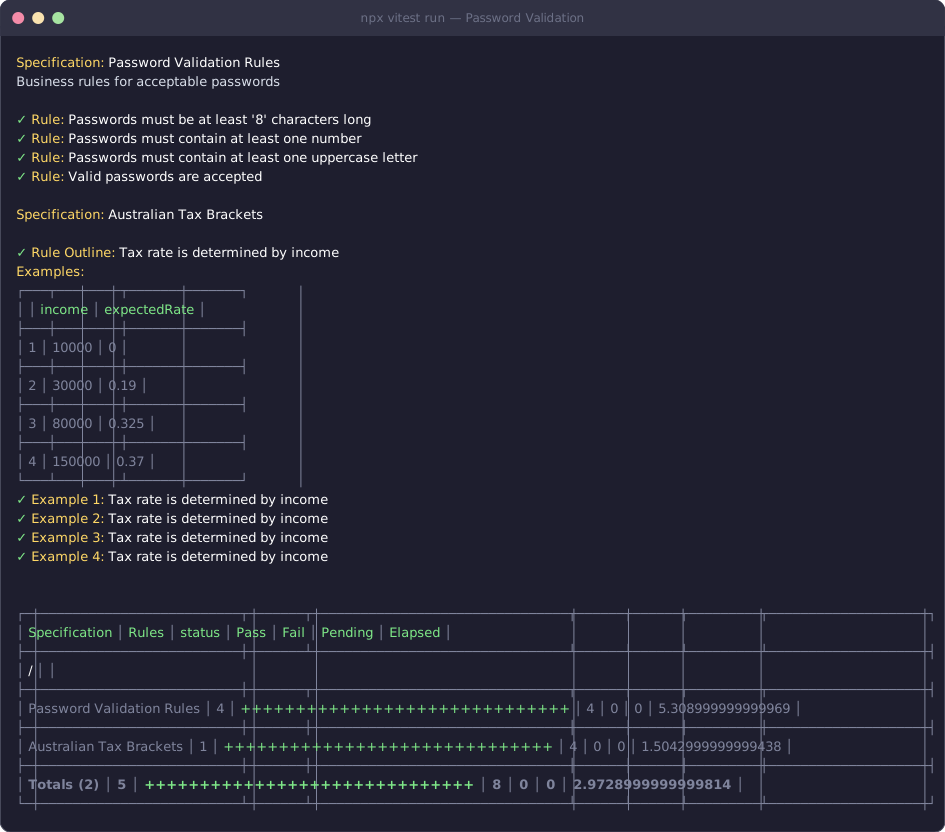
Compare this to a traditional test output:
✓ should validate password length
✓ should require numbers
✓ should require uppercase
✓ should accept valid passwords
The specification output reads like a requirements document, not a list of vaguely named functions.
Skip and Only
Focus or skip at any level:
specification.skip('Disabled spec', () => { /* ... */ });
specification.only('Focus here', () => { /* ... */ });

rule.skip('Not implemented yet', () => { /* ... */ });
rule.only('Debugging this one', () => { /* ... */ });

ruleOutline.skip('Skip data-driven test', () => { /* ... */ });
Complete Example: Email Validation
Here's a real-world specification combining all the concepts:
// tests/EmailValidation.Spec.ts
import { specification, rule, ruleOutline } from '@swedevtools/livedoc-vitest';

function isValidEmail(email: string): boolean {
  return /^[^\s@]+@[^\s@]+\.[^\s@]+$/.test(email);
}

specification(`Email Validation
  @validation
  Helps callers reject malformed addresses before using them.
`, () => {

  rule('Valid emails contain exactly one @ symbol', () => {
    expect(isValidEmail('user@example.com')).toBe(true);
    expect(isValidEmail('user@@example.com')).toBe(false);
    expect(isValidEmail('userexample.com')).toBe(false);
  });

  rule('Valid emails have a domain with a dot', () => {
    expect(isValidEmail('user@example.com')).toBe(true);
    expect(isValidEmail('user@example')).toBe(false);
  });

  ruleOutline(`Email '<email>' has validity '<valid>'
    Examples:
    | email                | valid |
    | alice@example.com    | true  |
    | bob.smith@work.co.uk | true  |
    | invalid              | false |
    | @no-local.com        | false |
    | no-domain@           | false |
  `, (ctx) => {
    expect(isValidEmail(ctx.example.email)).toBe(ctx.example.valid);
  });
});
Recap
specificationgroups related rules — use it for technical/domain logicruleis a single testable requirement with direct assertions — supportsasyncruleOutlineruns a rule across multiple data rows via an Examples table- Extract values from rule titles with
ctx.rule.valuesandctx.rule.params - Specification output reads like a requirements document, not a test log
Next Steps
- Next in this series: Data Extraction — master quoted values, tables, doc strings, and named parameters
- Deep dive: rule() Reference — full API details
- Deep dive: specification() Reference — full specification API